A software subscription pays for the application and the people who keep it running. I work out whether a system on your own infrastructure could deliver the functions and reliability you rely on at a lower total cost. You get a recommendation you can use at renewal or before buying hardware.
We walk through the jobs your staff actually do, including sign-in, permissions, integrations and reporting. I check the renewal quote, usage tiers, vendor support hours and service commitments. For a shared drive, for example, opening a document is only the first test. Can the right colleague edit it from a phone? Can someone restore yesterday’s version?
I identify which workflows a self-hosted application already covers, which need custom code and which still depend on the vendor. You can keep part of the subscription if replacing it adds more cost than value.
Estimate the cloud baseline
For an existing workload, I reconcile the bill with actual utilization, peak demand, discounts and commitments. For a planned service, I model compute hours, storage growth, managed services, backup retention and data transfer from your traffic forecast. We agree on the availability and recovery targets each option must meet.
Price the same service on premises
I size the hosts, storage and network for normal load and for the load a surviving site must carry. The estimate includes hardware replacement, power, space, links between sites, licensing, backups, monitoring and the people who will operate the platform. For a migration, I include the move and the period when both environments are running.
Who answers when the service stops?
I price the support coverage you need alongside the build. We assign responsibility for user requests, security patches, monitoring, incident response and restores. If the business needs someone available overnight, that coverage belongs in the estimate. Your team, a support provider or a separately scoped Quiet Release engagement can own the work.
Find the break-even point
You receive a side-by-side cost model for an agreed period, with the assumptions you can change. I show which subscriptions and cloud charges you could retire, what stays on the bill and when the cumulative savings would cover the investment, if they do.
A steady base load may justify hardware you own. A short seasonal peak may still be cheaper to serve in the cloud. We test how growth, staffing and the loss of a site change the recommendation before you commit to a purchase.
Build the option you choose
You can take the estimate and design to your team or engage me to implement it. I can build a private cloud across your locations and implement the workflows you choose to bring in-house. Before you retire the subscription, we test those workflows with users, rehearse a site outage and check the results against your agreed downtime and data-loss limits.
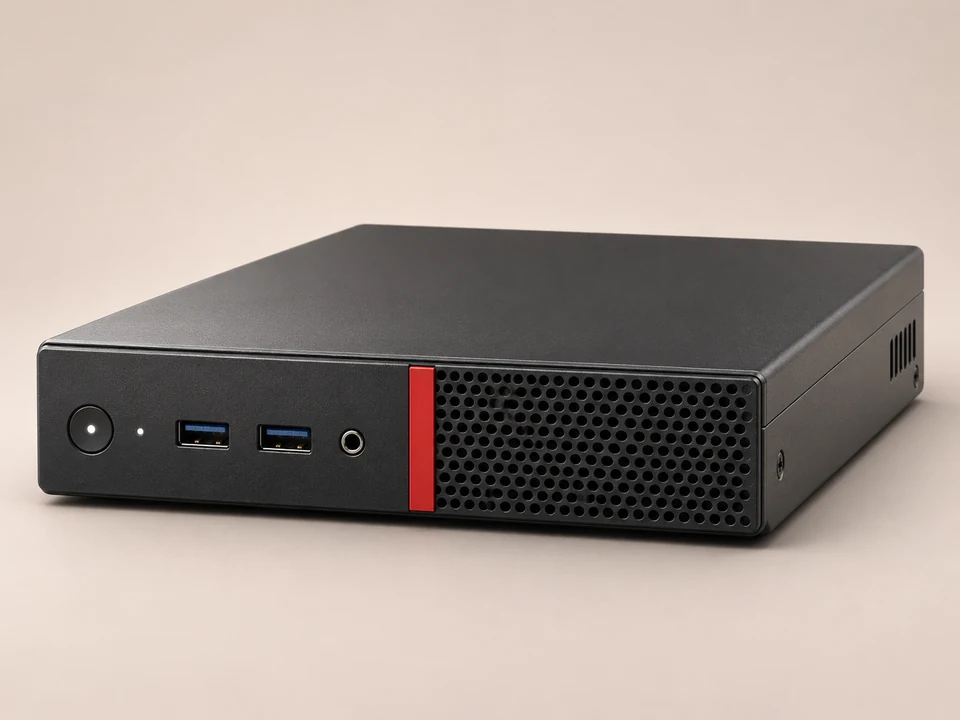
A branch that needs a local application during an internet outage may only need one Linux host. I size its CPU, memory and storage for the workload. It runs headless, with no dedicated monitor, keyboard or mouse.
Staff can use a browser on the local network or sign in remotely from a phone or laptop when connectivity is available. Central IT can review the first site’s outage test and authorize the next group of installations.
One possible host for a branch application
What keeps working during an outage?
The office loses internet
Cloud hosting
People on the office connection lose access to online-only apps. Those same apps can still be reached over mobile data or from another location if the cloud service is healthy.
On-premises hosting
Services that rely only on local power, networking and sign-in can keep working for people on site. Remote users lose their route in. Off-site backups and integrations with external systems wait for connectivity.
The application server fails
Cloud hosting
Applications on a single cloud server can go offline. A healthy replica can take over if the hosting plan includes one and traffic can reach it.
On-premises hosting
If there is only one host, its services stop until you restore them. A ready standby can shorten the interruption.
An entire location goes offline
Cloud hosting
An office outage leaves cloud services available to people elsewhere. If the cloud provider’s hosting location fails, continued access depends on a working copy at another location.
On-premises hosting
Two servers in the same building share a site outage. A standby elsewhere can serve users once traffic switches. People in the disconnected office still need another internet connection to reach it.
Which recovery plan fits your business?
Which services would you need back first? How long could your team work without them, and how much recent work could you reconstruct? We use your answers to set a recovery target and choose a plan you can afford.
Restore a replacement host
Allow time to source a replacement, install the software and restore your data. A spare on the shelf removes the wait for hardware. We time a practice restore with your data volume and verify that your team can complete a task it relies on.
Keep a second host on hot standby
A second machine stays powered on with the selected services and a current copy of their data. In a rehearsal, we switch over and back, measure the interruption and check which changes reached the standby.
Run services across two or more locations
Two offices, or an office and a secure standby server at home, can be designed for the same availability target you would seek in the cloud. Each site needs independent power and internet, enough capacity for the selected services, and a way to redirect traffic. Independent, encrypted off-site backups let you recover a deletion that reaches both sites.
Use Quiet Release as your standby location
Your primary workload can stay on your premises while I host a replica. The estimate includes the response hours you need, a second responder, and the cost of keeping a backup you control. We rehearse switching back and restoring elsewhere. See how support, recovery access and exit are agreed.